 by Schlosser Studio
Booth Math Workbook
The Booth Rent Decision Workbook
Commission, booth rent or a salon suite, side by side with your own numbers. Then, once you move, a weekly record of what is left after rent and costs, before taxes.
What is inside
Nine tabs, in the order you use them. Every cell you type in is shaded, and every example is marked so you can overwrite it.
- Start Here
- What each tab does, in the order you use them, and how to clear the examples.
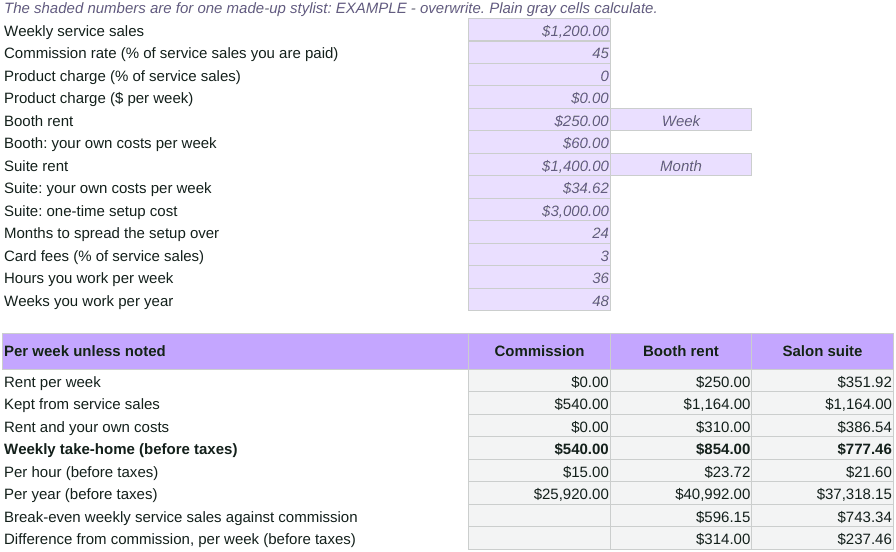
- Compare
- Commission, booth and suite on one screen: take-home a week, an hour and a year before taxes, and the break-even against commission.
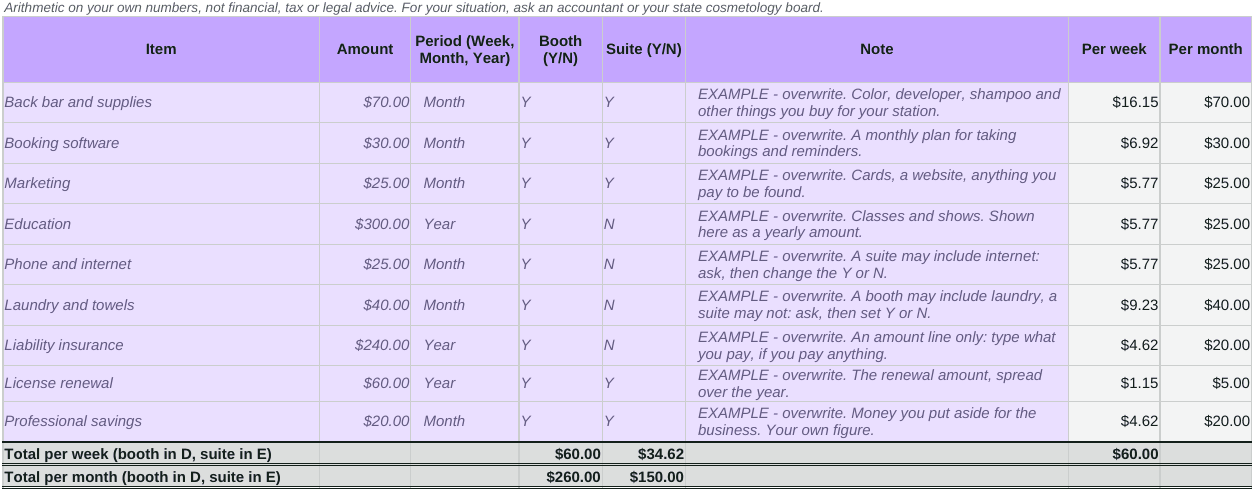
- Weekly Costs
- Every cost of working for yourself, by the week, month or year, marked booth or suite.
- Clients and Prices
- Your services, prices, minutes and clients a week, so your sales and your hours come from your own book.
- Price Increase
- A raise and a share of clients lost, in a table: what the week brings in either way.
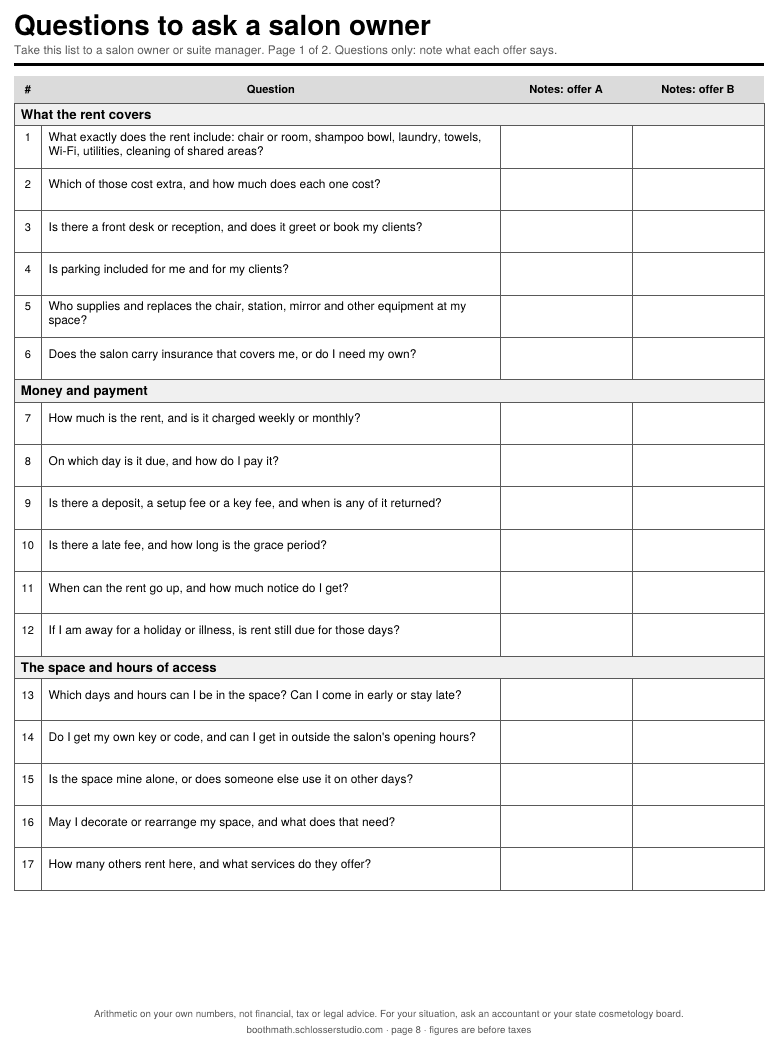
- Questions
- The printable questions for a salon owner, with room for notes.
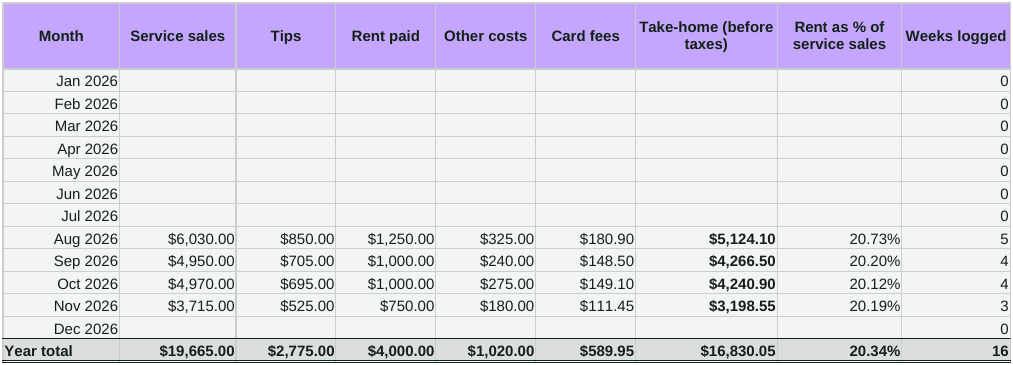
- Tracker
- A weekly log and a 12-month take-home, before taxes, once you have moved.
- Slow Season
- The figure you need each month against your months: how far below it the slow ones fall.
- Dashboard
- This year at a glance: sales, tips, rent, costs, take-home before taxes, rent share, best and lowest month.
The printable binder
The same pages on paper, for the counter or the car. Nine pages, US Letter, grayscale; it prints on A4 at 97%.
- A cover.
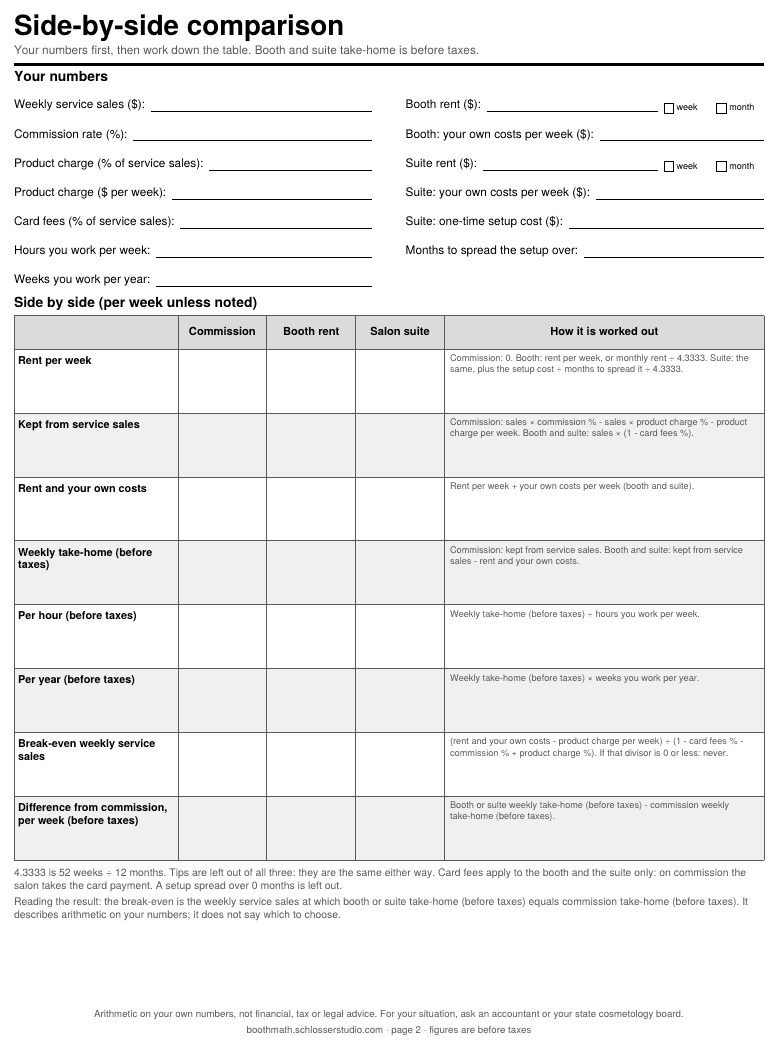
- The side-by-side comparison, with the formula printed beside each line.
- The weekly and monthly cost list.
- The client and price planner.
- The price-increase worksheet.
- The 12-month take-home tracker.
- The slow-season sheet.
- Two pages of questions to ask a salon owner.
See the real thing
Pictures of the built files, with the made-up example stylist still in them.
The tab pictures are wide: scroll them sideways, or tap one to open it full size.
Who it is for
- Stylists, barbers, nail techs, and lash, brow and esthetics pros on commission who have a booth or suite offer in hand and want the numbers on one screen.
- Anyone already renting a booth or suite who wants a weekly record of what is left after rent and costs, before taxes.
Who it is not for
- Salon owners paying staff.
- Tax preparation or bookkeeping: the workbook never estimates taxes and has no tax lines.
- Anyone who wants to be told which arrangement to choose: it shows the arithmetic and stops there.
- Lease or contract wording.
What you get
- A standard .xlsx spreadsheet that opens in your spreadsheet app. No macros.
- A 9-page printable PDF binder (US Letter; prints on A4) with the same pages.
- Instant download after you pay. No subscription, no account.
Questions you may have
- Will this work for my situation?
- If you can name your clients a week, your prices and your rent, yes. The example is a stylist on commission looking at a $250-a-week booth and a $1,400-a-month suite; barbers, nail techs, and lash, brow and esthetics pros use the same arithmetic with their own services.
- Does it do taxes?
- No. Every figure is before taxes, and the workbook does not estimate taxes and has no tax lines. For that, ask an accountant.
- Do I need special software?
- No macros and no add-ins. It is a standard .xlsx spreadsheet that opens in your spreadsheet app, and the binder is a PDF.
- Can I edit it?
- Yes, every tab. The cells you type in are shaded and checked, and nothing is locked.
- Will it tell me which to choose?
- No. It shows what each arrangement leaves you at your numbers and stops there.
- What if it is not right for me?
- This is a digital download. If it isn't useful to you, email us within 14 days and we will refund the $19 in full (the exact wording is in the box above).
What it is, and what it is not
- It is arithmetic on your own numbers, not financial, tax or legal advice.
- It shows no rent figures of its own, makes no income promises and has no tax lines.
- It does not touch lease or contract wording.
It is made by Schlosser Studio, a small studio whose products are built and maintained by AI assistants, and its Compare and Price Increase tabs were checked against the free calculators on this site to the cent.
Arithmetic on your own numbers, not financial, tax or legal advice. For your situation, ask an accountant or your state cosmetology board.